
 Satoshi Yoneda
8a3de42d61
New: debian/
Satoshi Yoneda
8a3de42d61
New: debian/
|
преди 3 месеца | |
|---|---|---|
| Deploy | преди 3 месеца | |
| debian | преди 3 месеца | |
| icons | преди 3 месеца | |
| img | преди 3 месеца | |
| include | преди 3 месеца | |
| resources | преди 4 месеца | |
| src | преди 3 месеца | |
| translations | преди 3 месеца | |
| CMakeLists.txt | преди 3 месеца | |
| CMakePresets.json | преди 4 месеца | |
| LICENSE.md | преди 4 месеца | |
| README.md | преди 3 месеца | |
| RESOURCE | преди 3 месеца | |
| i18n | преди 3 месеца | |
| resources.qrc | преди 3 месеца |
README.md
DupFind - 類似画像ファイル検索・整理ツール
ストレージにある類似した画像ファイルを検索するツールです。Antigravityを利用して初めてバイブコーディングで開発してみました。コードをほとんど書かずに何かを作ったのは初めてですが、それなりに活用できそうなツールができたので公開しておきます。
過去の撮影した写真や利用した画像ファイル類を整理したいということは多いと思います。画像の内容で検索するツールはいくつかありますが、本DupFindはシンプルなpHash/dHashを用いることで、高速に類似画像を検索します。また、GUIとCLIを併用することで、効率の良い整理作業ができることが特徴です。
なお、画像の近似判定にpopcnt命令が必要なので、x86ではSSE4.2に対応したCPUが必要です。古いCPUでは動作しない可能性がありますが、SSE4.2に対応していないCPU(Nehalem/初代Coreプロセッサより古いCPU)が現役であるとは考えにくいので、ほとんど問題が起きることはないでしょう。
特徴
- pHash/dHashによる高速な類似画像検索。検索ディレクトリのキャッシュが完了していればローエンドCPUでも10万ファイル前後を、高速なCPUならば数十万ファイルを1秒程度で検索できます。
- CLIを使ってバックグラウンドでの画像ハッシュ計算に対応
- マルチプラットフォーム(WindowsとLinuxで動作を確認)
使い方
書き込み権限があるディレクトリに、実行ファイルとWindowsではDLLなど一式を配置します。配置したディレクトリに設定ファイルDupFind.iniとキャッシュファイルdupfind_cache.dbが自動生成されるので、書き込み権限が必ず必要です。その点は注意してください。
DupFindがGUI、DupFindCmdがCLIです。
DupFind
GUIのDupFindを起動すると次のようなウィンドウが表示されます。
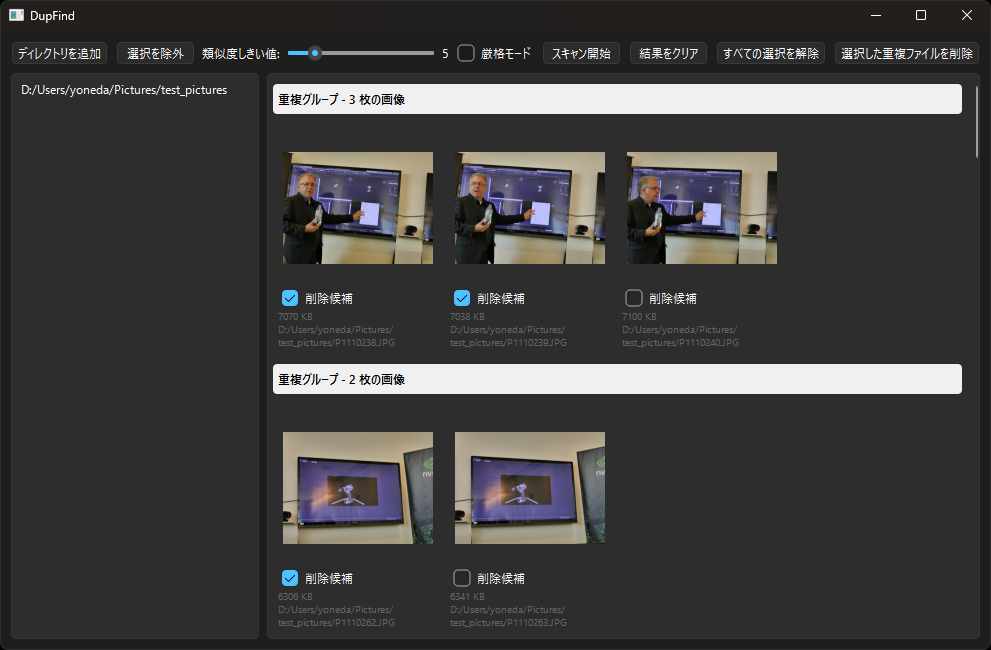
ディレクトリを追加
検索するディレクトリを追加します。追加したディレクトリはリストに表示されます。ディレクトリは複数指定可能です。ディレクトリをドラッグ&ドロップで追加することもできます。
選択を除外
リストで選択したディレクトリを検索対象から外します。リストから削除しても、キャッシュ内の情報は保持されます。
類似度しきい値
検索する際の類似度の閾値を設定します。値が小さいほど類似度が高くなります。デフォルトは5です。
厳密モード
Strictにチェックを入れると、厳密モードで検索します。通常はチェックを入れなくても良いでしょう。
スキャン開始
検索を開始します。検索中はGUIがフリーズしますが、バックグラウンドで画像ハッシュの計算を行っています。検索が完了すると、結果が表示されます。グループ表示されている類似画像のチェックボックスは、削除候補です。チェックを入れた画像が削除対象になります。デフォルトではファイルサイズが小さいものが削除候補になります。必要に応じてチェックを外してください。
サムネイルをダブルクリックすると、OSで関連付けられているビューアーが起動し、画像を表示します。また、サムネイルを右クリックするとメニューが表示され、「Copy Full Path」で画像のフルパスをクリップボードにコピーでき、「Remove from List」でリストから削除できます。
結果をクリア
検索結果をクリアします。キャッシュは削除されません。
すべての選択を解除
チェックボックスをすべて外します。
選択肢た重複ファイルを削除
チェックを入れた画像を削除します。削除した画像は、OSのゴミ箱に移動します。
単一画像に類似する画像の検索
GUIのウィンドウ上で、画像ファイルをドラッグ&ドロップすると、その画像に類似する画像を検索します。検索結果は、GUIのウィンドウ上に表示されます。ブラウザに表示されている画像もドロップできます。
DupFindCmd
DupFindCmdは、ヘルパーコマンドです。CLIで利用します。コマンドパラメータは次の通り。
DupFindCmd add directory_path
DupFindCmd remove directory_path
DupFindCmd rescan
DupFindCmd th N
DupFindCmd strict on|off
DupFindCmd search image_file
add directory_path
指定したdirectory_pathを検索対象に追加し、バックグラウンドで情報をキャッシュに格納します。GUIのStart Scanと同じ動作ですが、バックグラウンドで実行され結果は表示されません。大量の画像があるディレクトリを、あらかじめaddコマンドでキャッシュしておくことで、GUIのStart Scanの実行時間を短縮できます。
remove directory_path
directory_pathを検索対象から除外します。キャッシュ内の情報は保持されます。
rescan
現在の検索対象ディレクトリを再スキャンし、ファイルの変更を反映します。GUIのStart Scanと同じ動作ですが、バックグラウンドで実行され結果は表示されません。
th N
類似度の閾値をNに設定します。Nには0から32の間の値を指定してください。デフォルトは5です。
strict on|off
Strictモードをオンまたはオフに設定します。デフォルトはオフです。
search image_file
指定したimage_fileと類似する画像をキャッシュ内から検索します。検索時に使われる閾値とStrictモードは現在の設定が使われます。結果は標準出力に出力されます。image_fileの情報はキャッシュされません。
ビルド方法
Linux
ビルドにはOpenCV、Qt6、SQLite3が必要です。これらのライブラリ及びヘッダファイル群をインストールしてから、次のコマンドを実行してください。Debian/Ubuntuの場合は次のようにインストールします。
sudo apt update
sudo apt install build-essential cmake
sudo apt install qt6-base-dev qt6-declarative-dev libqt6concurrent6
sudo apt install qt6-l10n-tools qt6-tools-dev qt6-tools-dev-tools
sudo apt install libopencv-dev
sudo apt install libsqlite3-dev
sudo apt install libprotobuf-dev
ソースコードを適当なディレクトリに配置後、そのディレクトリに移動して次のコマンドを実行します。
cmake -B build
cmake --build build
Windows
Windows上でのビルドにはVisual Stduio 2026を利用しました。vcpkgなどを使ってOpenCV、Qt6、SQLite3をインストールしてください。OpenCVやQtはvcpkgを使うより公式のインストーラーを利用したほうが楽かもしれません。SQLite3はvcpkgで簡単にインストールできるはずです。
Visual Studio 2026でCMakeプロジェクトとして開いてビルドします。CMakeを利用する場合は、環境に合わせてCMakePresets.jsonを作成してください。ソースコードに添付しているCMakePresets.jsonはあくまでサンプルです。
その他
OSに依存していないので、OpenCV、SQLite3、Qt6がインストールされていれば、macOSやその他のOSでビルドできるはずです。
謝辞
DupFindの開発には以下のライブラリを利用しました。感謝いたします。
- OpenCV
- Qt 6
- SQLite3
English
DupFind - Similar Image File Search & Organization Tool
A tool to search for similar image files in your storage. I developed this using Antigravity through "vibe coding" for the first time. It's my first time building something with almost no code written manually, but it turned out to be a quite useful tool, so I am publishing it.
Many people probably want to organize their past photos and image files. Although there are several tools that can search based on image content, DupFind searches for similar images quickly using a simple pHash/dHash. It features efficient organization workflows by combining GUI and CLI tools.
Note: Since the image similarity judgment requires the popcnt instruction, an x86 CPU supporting SSE4.2 is required. It might not work on very old CPUs, but since it is highly unlikely that CPUs lacking SSE4.2 support (older than Nehalem / 1st Gen Core processors) are still in active use, this should rarely be an issue.
Features
- High-speed similar image search using pHash/dHash. If the search directory is cached, it can search around 100,000 files on a low-end CPU and several hundred thousand files on a high-end CPU in about 1 second.
- CLI support for calculating image hashes in the background
- Multi-platform (Confirmed to work on Windows and Linux)
Usage
Place the executable along with the necessary DLLs (on Windows) in a directory where you have write permissions. Please be aware that you absolutely need write permissions because the configuration file DupFind.ini and the cache file dupfind_cache.db will be auto-generated in this directory.
DupFind is the GUI, and DupFindCmd is the CLI.
DupFind (GUI)
When you launch the DupFind GUI, the following window will be displayed:
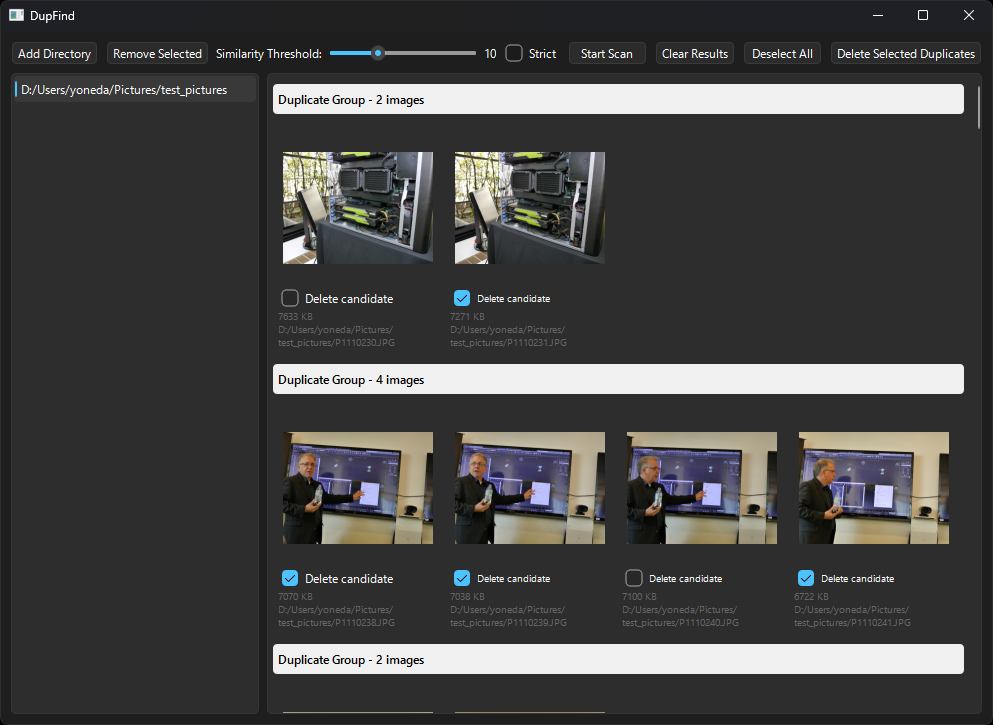
Add Directory
Add a directory to search. The added directories will be shown in the list. You can specify multiple directories. You can also add directories by dragging and dropping them.
Remove Directory
Remove the selected directory from the search targets. Even if removed from the list, the information within the cache is retained.
Similarity Threshold
Set the threshold for similarity when searching. A smaller value indicates higher similarity. The default is 5.
Strict Mode
Checking "Strict" will search in strict mode. Usually, you don't need to check this.
Start Scan
Starts the search. The GUI will freeze during the search, but it is calculating image hashes in the background. Once the search is complete, the results are displayed. The checkboxes on the grouped similar images indicate candidates for deletion. The checked images will be targeted for deletion. By default, smaller file sizes are marked as deletion candidates. Please uncheck them as necessary.
Double-clicking a thumbnail opens the image in your OS's default viewer. Right-clicking a thumbnail opens a menu where you can copy the full path of the image to the clipboard using "Copy Full Path", or remove the item from the list using "Remove from List".
Clear Results
Clears the search results from the UI. The cache is not deleted.
Deselect All
Unchecks all checkboxes.
Delete Selected
Deletes the checked images. Deleted images are moved to the OS Trash/Recycle Bin.
Single File Mode
You can specify a single image file to search for similar images by dragging and dropping it onto the window. The results are displayed in the same way as the normal search. The image itself is not cached.
DupFindCmd (CLI)
DupFindCmd is a helper command used from the CLI. The command parameters are as follows:
DupFindCmd add directory_path
DupFindCmd remove directory_path
DupFindCmd rescan
DupFindCmd th N
DupFindCmd strict on|off
DupFindCmd search image_file
add directory_path
Adds the specified directory_path to the search targets and stores its information in the cache in the background. It performs the same operation as the GUI's "Start Scan" but runs in the background without displaying results. By caching directories with a large number of images using the add command beforehand, you can shorten the execution time of "Start Scan" in the GUI.
remove directory_path
Removes the specified directory_path from the search targets.
rescan
Rescans the specified directory_path and updates its information in the cache. It performs the same operation as the GUI's "Start Scan" but runs in the background without displaying results. By rescanning directories with a large number of images using the rescan command beforehand, you can shorten the execution time of "Start Scan" in the GUI.
th N
Sets the similarity threshold to N. Please specify a value between 0 and 32 for N. The default is 5.
strict on|off
Turns strict mode on or off. The default is off.
search image_file
Searches the cache for images similar to the specified image_file. The threshold and strict mode used during the search rely on the current settings. The results are output to standard output. Information about image_file itself is not cached.
Build Instructions
Linux
Building requires OpenCV, Qt6, and SQLite3. Please install these libraries and their header files, then run the following commands. For Debian/Ubuntu, install them as follows:
sudo apt update
sudo apt install build-essential cmake
sudo apt install qt6-base-dev qt6-declarative-dev libqt6concurrent6
sudo apt install qt6-l10n-tools qt6-tools-dev qt6-tools-dev-tools
sudo apt install libopencv-dev
sudo apt install libsqlite3-dev
sudo apt install libprotobuf-dev
After placing the source code in an appropriate directory, navigate to that directory and run the following commands:
cmake -B build
cmake --build build
Windows
Visual Studio 2026 was used to build on Windows. Please install OpenCV, Qt6, and SQLite3 using tools like vcpkg. For OpenCV and Qt, it might be easier to use their official installers instead of vcpkg. SQLite3 should be easily installable via vcpkg.
Open it as a CMake project in Visual Studio 2026 to build. When using CMake, please create a CMakePresets.json that matches your environment. The CMakePresets.json attached to the source code is just a sample.
Others
Since it is OS-independent, you should be able to build it on macOS or other operating systems as long as OpenCV, SQLite3, and Qt6 are installed.
Acknowledgments
The following libraries were used in the development of DupFind. I am grateful for them:
- OpenCV
- Qt 6
- SQLite3